
Designing Secure Third-Party Access to Water and Wastewater OT Environments
By Franklyn C. Adams,
Timehri Networks
Vendors and system integrators are essential partners for many water and wastewater utilities.
They commission PLCs, troubleshoot instrumentation, maintain SCADA applications, support variable-frequency drives, update specialized equipment, and provide expertise that may not be available internally.
That creates a practical cybersecurity challenge:
How should a vendor securely connect to a utility when remote access to operational technology is necessary?
The answer should generally not be a permanent VPN connection that places a vendor workstation directly onto the SCADA network.
A stronger approach treats vendor access as a controlled, temporary, monitored pathway through multiple security boundaries.
For many utilities, the target architecture should look more like this:
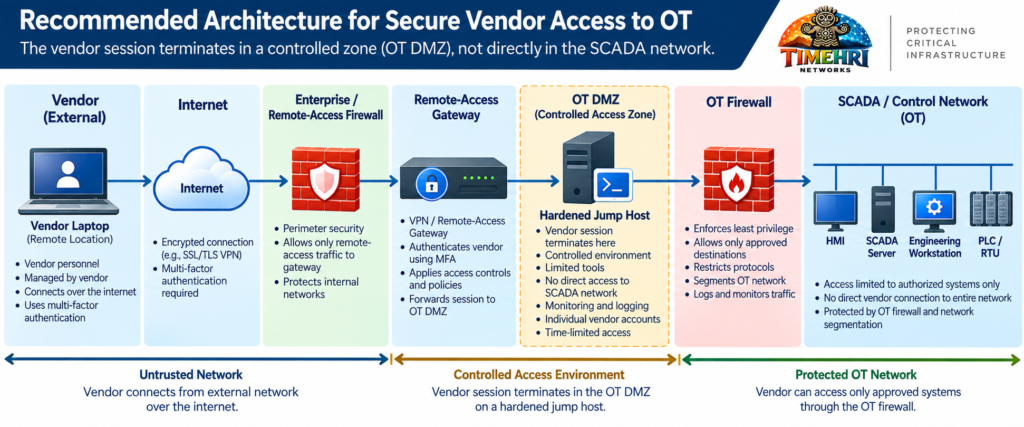
The objective is straightforward:
Give the vendor access to the specific system required to perform the approved work, for the period that access is required, without giving the vendor general access to the OT network.
Why Vendor Access Deserves Special Attention
Third-party access creates a different security relationship than employee access.
A utility controls its own computers, identity systems, security policies, endpoint protection, patching practices, and personnel procedures.
It may have considerably less visibility into a vendor’s environment.
The utility may not know whether the computer initiating the connection is shared with other customers, whether credentials have been stored locally, whether the endpoint has current security controls, or whether another organization has administrative access to it.
That does not mean vendors are inherently insecure.
It means the utility is extending trust beyond an environment it directly controls.
CISA’s guidance on remote access to operational technology emphasizes securing remote connections, using phishing-resistant multifactor authentication where possible, implementing network segmentation, restricting privileges, and monitoring remote activity.
CISA — Secure Remote Access Software
The architecture should therefore assume that vendor access is an exception that must be controlled, rather than simply another device joining the SCADA network.
Avoid Direct Vendor-to-OT Connectivity
Consider a seemingly convenient arrangement:
Figure 1 — Example of How Some Vendors Connect to the SCADA Network
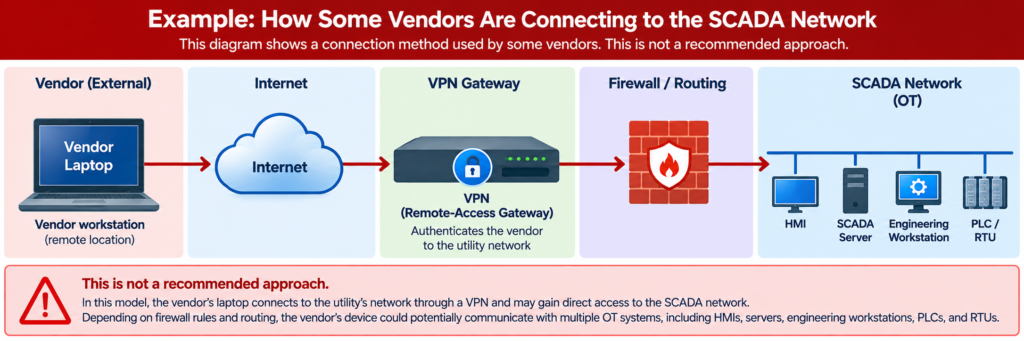
Once authenticated, the vendor’s device may effectively become another endpoint on the operational network.
Depending on firewall rules and routing, that endpoint could potentially communicate with multiple HMIs, servers, engineering workstations, PLCs, RTUs, or other OT devices.
The concern is not limited to malicious vendor activity.
A compromised vendor workstation or stolen vendor credentials could provide an attacker with the same pathway.
A more defensive principle is:
Authenticate the vendor to a controlled access environment, not directly to the process-control network.
This is where an OT DMZ and jump host become important.
The OT DMZ as a Security Boundary
An Operational Technology Demilitarized Zone, or OT DMZ, creates an intermediary security zone between less-trusted networks and the control environment.
Instead of allowing a remote vendor session to terminate directly inside the SCADA network, the vendor first connects through the utility’s remote-access infrastructure. After authentication, the vendor is provided access to a controlled jump host located within the OT DMZ. A separate OT firewall then restricts communications between the DMZ and the SCADA or control network.
This design creates multiple security boundaries between the vendor’s workstation and the systems responsible for controlling the physical process.
Figure 2 — Example Secure Vendor Access Architecture
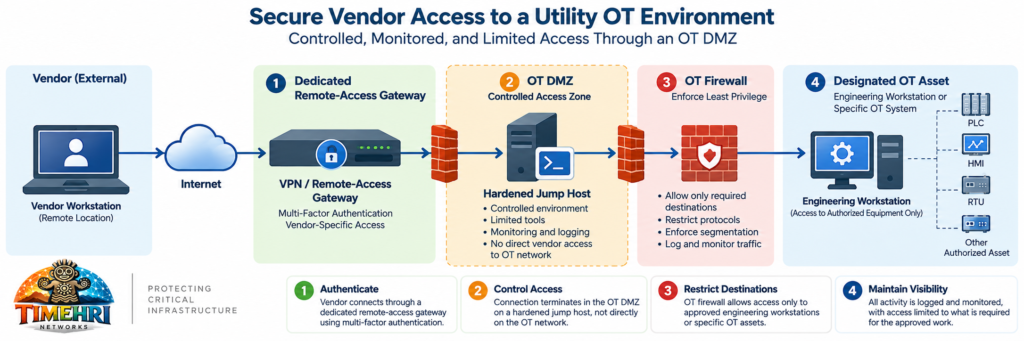
The OT firewall determines which systems and services the jump host is permitted to reach. A vendor supporting a specific system should therefore not automatically receive network-level access to unrelated HMIs, SCADA servers, engineering workstations, PLCs, or RTUs.
This creates an important distinction:
The vendor is not being granted access to the OT network as a whole. The vendor is being granted controlled access to specific resources required to perform authorized work.
Guidance from CISA and other federal agencies recommends strong segmentation between IT and OT environments and the use of controlled intermediary systems, such as jump servers, where remote access is necessary.
CISA — Primary Mitigations to Reduce Cyber Threats to Operational Technology
Use a Hardened Jump Host
The jump host becomes the vendor’s controlled working environment.
Rather than allowing the vendor’s laptop to communicate directly with a PLC engineering workstation or SCADA server, the vendor first establishes an authenticated session to the jump host.
From there, access to OT is tightly restricted.
The utility can control software installed on the jump host, apply security updates, maintain endpoint protection, restrict administrative privileges, collect logs, and terminate the remote session without depending on the security configuration of the vendor’s computer.
Where practical, separate jump hosts or virtual sessions can also be used for different vendors or functions.
Require Multi-Factor Authentication
A password alone should not be the only control protecting remote OT access.
Credentials can be phished, reused, stolen, or exposed through another compromise.
Remote-access accounts should use MFA wherever the technology supports it.
CISA strongly recommends MFA for remote access and recommends phishing-resistant MFA where available.
MFA does not eliminate the need for segmentation or access restrictions.
It provides another security layer.
A useful way to think about the architecture is:
These controls serve different purposes. Identity controls establish who may connect, firewall policy limits where that user may go, the jump host provides a controlled environment for interacting with OT, and monitoring creates a record of the activity.
No single control should carry the entire security burden.
Give Vendors Individual Accounts
Shared vendor accounts create accountability problems.
An account called:
VENDOR
or
SCADA_SUPPORT
may be convenient, but if several technicians know the password, the utility may have difficulty determining who actually connected.
Whenever technically feasible, each authorized vendor technician should have an individual identity.
For example:
j.smith_vendorname
rather than:
vendor_support
Individual accounts make it easier to:
- Disable one person’s access without affecting others
- Associate activity with a specific user
- Enforce MFA
- Establish expiration dates
- Investigate incidents
- Demonstrate accountability during audits
Accounts should also be reviewed periodically and removed when individuals change roles or no longer support the utility.
Access Should Be Temporary Whenever Practical
Vendor access does not necessarily need to remain available 24 hours a day, 365 days a year.
For many environments, a stronger model is just-in-time access.
Figure 3 — Just-in-Time Vendor Access Workflow
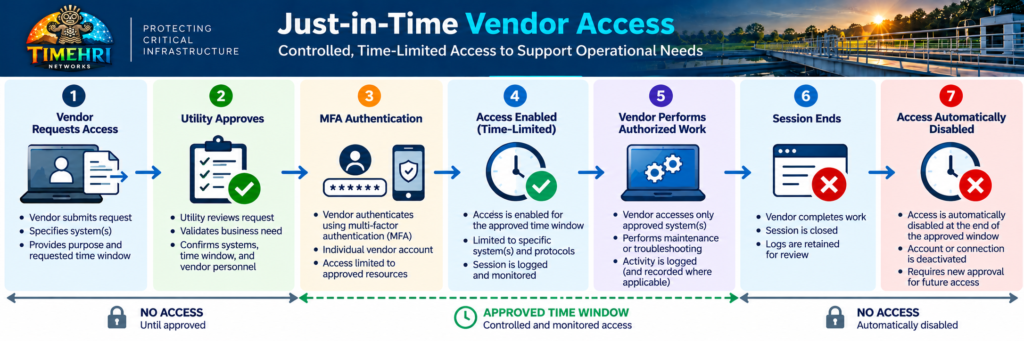
Once approved, access should be available only for the established maintenance window. When the work is completed or the approved window expires, the connection should be disabled automatically.
For example:
Approved maintenance window:
Tuesday
10:00 AM–12:00 PM
Vendor: ABC Controls
Target: PLC Engineering Workstation
Purpose: Pump Station 4 PLC troubleshooting
At 12:00 PM, the authorization expires.
Emergency procedures can provide expedited access when an operational event requires immediate vendor support.
This reduces the amount of time an external pathway remains available for misuse.
Restrict Access to the Required Destination
A vendor supporting a chlorination system does not necessarily need access to every PLC in the treatment plant.
A vendor supporting a VFD does not necessarily need access to the historian.
A system integrator working on one remote station does not automatically need access to every remote station.
Firewall policy should therefore restrict vendor access to the systems and services required for the approved work. Depending on the application, that may mean access only to a designated engineering workstation or, where technically and operationally appropriate, a specific OT device using only the required protocol.
Figure 4 — Least-Privilege Vendor Access
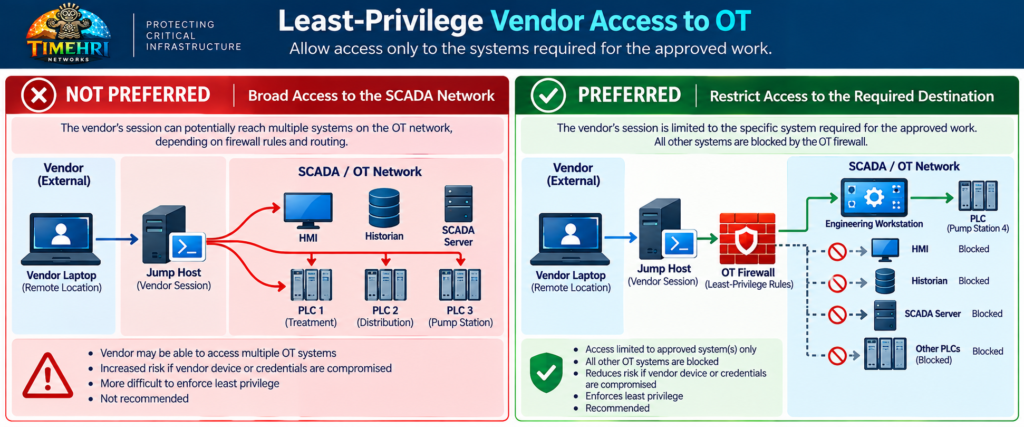
The exact design will depend on the application and vendor workflow.
The important principle is:
Access should correspond to the work being performed, not simply to the network where the equipment happens to reside.
Consider Protocol Restrictions
Destination restrictions can be strengthened by controlling the protocols permitted across the OT firewall.
If a vendor requires HTTPS to manage a specific appliance, there may be no reason for that connection to permit SMB, SSH, RDP, or unrelated industrial protocols.
If an engineering workstation is the approved intermediary, the vendor may only need remote desktop access to that workstation rather than direct communications with the PLC network.
This creates another layer of containment.
A firewall rule should ideally answer four questions:
Who is connecting?
From where?
To what system?
Using what service?
The more precisely those questions can be answered, the less unnecessary access the connection provides.
Monitor and Record Vendor Activity
Remote access should generate security logs.
At minimum, the utility should be able to determine:
- Who connected
- When the connection began
- Where the connection originated
- Which jump host was used
- What destination was accessed
- When the session ended
- Whether authentication attempts failed
Where technically, operationally, contractually, and legally appropriate, utilities may also consider session recording for privileged vendor activity.
Logs should be forwarded to centralized monitoring where feasible.
For larger utilities, this may be a SIEM.
For smaller utilities, the solution may be simpler.
The important point is that vendor activity should not disappear when the VPN session ends.
Control File Transfers
Vendor support frequently requires moving files into or out of OT.
Examples include:
- PLC programs
- Firmware
- Configuration files
- Software updates
- Diagnostic packages
- Log files
Allowing unrestricted file transfer from a vendor laptop directly into the control environment can undermine otherwise strong network segmentation.
A controlled architecture can establish a designated file-transfer process where files are scanned and validated before entering OT.
A simplified flow might be:
Figure 5 — Controlled Vendor File Transfer
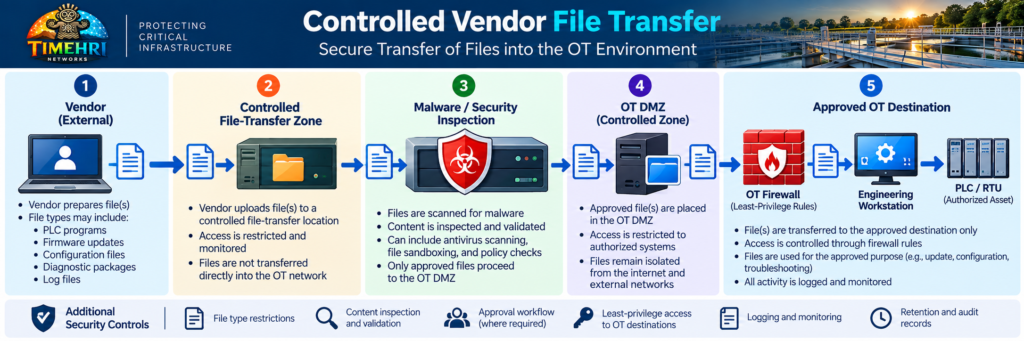
For highly sensitive environments, the transfer process may require manual approval.
The appropriate control should reflect the utility’s risk and operational requirements.
Vendor Connections Should Have an Owner
Every remote vendor connection should have someone inside the utility responsible for it.
That person or team should understand:
- Why the vendor requires access
- Which systems the vendor supports
- Who at the vendor is authorized
- What authentication is required
- When access should be available
- When the relationship should be reviewed
Without ownership, remote-access pathways can outlive the projects that created them.
Table 1 provides an example of the information a utility might maintain in a vendor access register.
Table 1 — Example Vendor Access Register
| Vendor | Purpose | Authorized Destination | MFA | Access Window | Utility Owner | Review |
|---|---|---|---|---|---|---|
| SCADA Integrator | PLC support | Engineering workstation | Yes | On demand | OT Manager | Quarterly |
| Pump Vendor | Pump controller support | Pump gateway | Yes | Approved window | Maintenance | Quarterly |
| VFD Vendor | Drive diagnostics | VFD engineering station | Yes | On demand | Electrical | Quarterly |
This turns vendor connectivity into a managed process rather than a collection of firewall rules.
Don’t Forget Outbound Vendor Connections
Not every vendor connection begins outside the utility.
Some industrial appliances establish outbound connections to vendor cloud platforms for:
- Remote monitoring
- Diagnostics
- Licensing
- Software updates
- Predictive maintenance
- Technical support
Because the connection originates inside the network, it may receive less attention than an inbound VPN.
It deserves the same scrutiny.
Figure 6 — Outbound Vendor Cloud Access
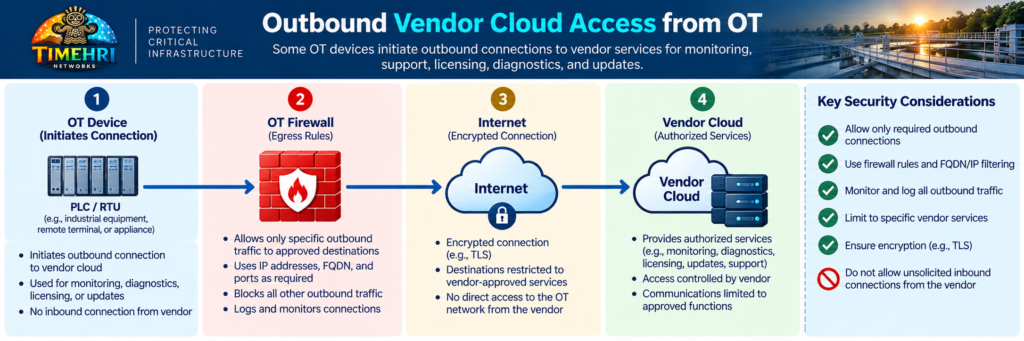
Utilities should understand:
Where is the device connecting?
What information leaves the environment?
What commands can return through that connection?
Is the service required?
Can the destination be restricted?
What happens if the vendor’s cloud environment is compromised?
An outbound connection is still a pathway between the utility and an external organization.
The Architecture Timehri Would Prefer
There is no single architecture appropriate for every utility, but a strong reference model for privileged third-party OT access is:
Figure 7 — Timehri Networks Reference Architecture for Secure Vendor OT Access
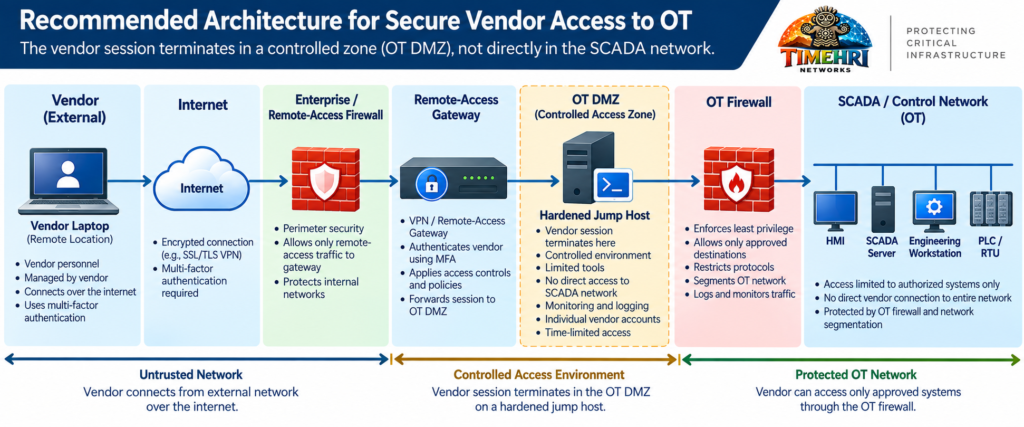
with:
Centralized Logging + Session Monitoring + Time-Limited Authorization
around the entire process.
Where the risk justifies it, additional controls may include:
- Privileged Access Management
- Just-in-time credentials
- Session recording
- Managed vendor workstations
- File-transfer inspection
- Vendor-specific virtual desktops
- Approval workflows
- Automatic account expiration
The objective is not to make vendor support difficult.
It is to make vendor support controlled and observable.
A Vendor Access Review Checklist
Utilities can begin by asking:
□ Do we know every vendor with remote OT access?
□ Does each vendor have a documented operational requirement?
□ Does remote access terminate outside the control network?
□ Is an OT DMZ or equivalent security boundary used?
□ Must vendors traverse a hardened jump host?
□ Is MFA required?
□ Does each technician have an individual account?
□ Are accounts disabled when no longer required?
□ Is access limited to approved OT destinations?
□ Are unnecessary protocols blocked?
□ Can vendor access be enabled only when needed?
□ Are sessions and authentication events logged?
□ Are file transfers controlled?
□ Are vendor cloud connections documented?
□ Is every vendor connection assigned to a utility owner?
□ Are vendor-access privileges reviewed periodically?
A “no” answer does not automatically mean the architecture is insecure.
It identifies an area worth evaluating against the utility’s operational requirements and risk.
Cybersecurity Must Support Operations
Vendor access exists for a reason.
When a pump fails at 2:00 AM, remote access to an experienced technician can significantly reduce downtime.
When a PLC problem affects treatment operations, waiting for an integrator to travel several hours to the facility may not be operationally acceptable.
Cybersecurity architecture should preserve those capabilities.
The goal is therefore not:
Keep vendors out.
It is:
Give authorized vendors the access they need, when they need it, to the systems they need, while maintaining utility control over the connection.
That distinction is fundamental.
Final Thought
The strongest vendor-access architecture does not depend on trusting a vendor laptop simply because the person operating it is trusted.
It assumes that credentials can be compromised, endpoints can become infected, accounts can be forgotten, and external organizations can experience security incidents.
Security comes from the architecture surrounding that trust.
Authenticate the user.
Terminate the connection in a controlled zone.
Use a hardened intermediary.
Restrict the destination.
Limit the time.
Monitor the activity.
Review the access.
For water and wastewater utilities, vendor connectivity should be treated as a controlled pathway into critical infrastructure, not simply another VPN account.
Because the question is not only:
Can the vendor connect?
The more important question is:
Once connected, exactly where can the vendor go?
About Timehri Networks
Timehri Networks focuses on Operational Technology (OT), Industrial Control Systems (ICS), SCADA, and critical-infrastructure cybersecurity. We help utilities and industrial organizations evaluate network architecture, remote-access pathways, firewall configurations, and cybersecurity controls to strengthen operational resilience.
Protecting Critical Infrastructure Through Practical Cybersecurity.
Sources & Further Reading
- CISA — Guide to Securing Remote Access Software
- CISA — More Than a Password: Multi-Factor Authentication
- CISA — Primary Mitigations to Reduce Cyber Threats to Operational Technology
- CISA — Principles of Operational Technology Cybersecurity
- NIST — Guide to Operational Technology Security (SP 800-82 Rev. 3)